Wonderbar: A Whimsical 70s Display Font for Creative Projects
There's a particular charm to the typography of the 1970s—a playful, hand-lettered quality that feels both nostalgic and freshly inventive. Wonderbar captures that exact vibe. It’s a premium display font designed to inject personality, fun, and a touch of retro whimsy into your work. If you’re looking for a typeface that feels like a sunny afternoon at a vintage amusement park, you’ve found it. This isn’t just another novelty font; it’s a carefully crafted creative asset with real-world utility for designers, marketers, and creators who need to make a memorable visual statement.
More Than Just a Pretty Face: Understanding Wonderbar's Design
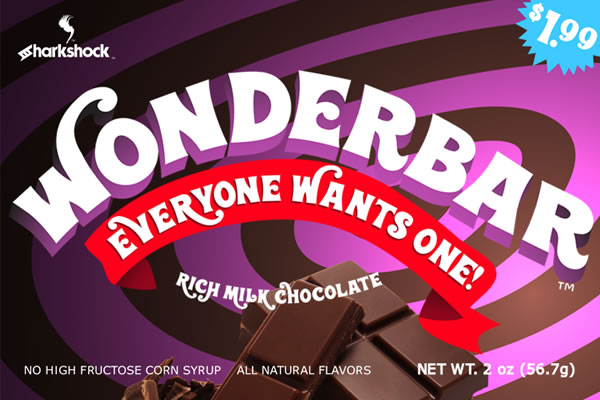
At its core, Wonderbar is a mouth-watering display typeface. Its character stems from loopy, energetic letterforms with exaggerated ascenders and descenders, giving it a dynamic, almost bouncing rhythm. This stylistic choice is central to its appeal, evoking the free-spirited graphic design of the 70s. Think of the lettering on vintage candy packaging, children’s book covers, or psychedelic concert posters—Wonderbar sits comfortably in that lineage, but with a polished, contemporary execution.
The font’s personality is unmistakably playful and approachable. It’s designed to be the life of the party in any project, instantly setting a tone of fun, creativity, and lightheartedness. For a brand, this can be a powerful tool. Using Wonderbar in your logo design or packaging can signal to your audience that your product is joyful, inventive, and doesn’t take itself too seriously. It’s a fantastic way to differentiate in a market saturated with sleek, modern typography and minimalist sans serif fonts.
Practically, the full version of Wonderbar is equipped for serious design work. It includes a full basic Latin character set, punctuation, kerning for proper letter spacing, and extensive language support with European accents and diacritics. For designers who love customization, it offers alternates and stylistic sets accessible via the glyphs panel in your software. A few ligatures are also included to enhance the natural flow of the lettering. It’s important to note, due to its loopy style, some glyph overlap is to be expected—this is a feature, not a bug, adding to its hand-crafted, organic feel.
Strategic Applications: Where Wonderbar Truly Shines
Knowing where a font like Wonderbar excels is key to using it effectively. Its strength lies in display and headline applications where personality needs to lead. Here’s a practical breakdown of its best uses:
- Branding & Identity: Perfect for logos, wordmarks, and brand collateral for businesses targeting families, children, crafters, or the food industry (think bakeries, ice cream shops, or artisanal candy brands). It builds an instant, friendly connection.
- Publishing & Editorial: A standout choice for children’s book titles and chapter headings, magazine headlines, or blog post graphics that need to grab attention on a crowded social media feed.
- Packaging Design: This is where Wonderbar can truly work magic. Use it for product names, flavor labels, or taglines on packaging to create shelf appeal that feels both nostalgic and premium.
- Marketing & Digital Media: Inject energy into social media graphics, email newsletter headers, website hero sections, or event posters. It’s particularly effective for campaigns promoting sales, launches, or community events.
- Personal & Craft Projects: Ideal for DIY projects, greeting cards, scrapbooking, party invitations, or merchandise like t-shirts and tote bags. It adds a professional, polished touch to personal creations.
Conversely, it’s not the right choice for long blocks of body text. Its decorative nature would compromise readability in paragraphs. The smart strategy is to pair it with a clean, highly legible serif or sans serif font for body copy, letting Wonderbar handle the visual impact where it’s needed most.
Practical Guide: Choosing and Pairing Wonderbar
Integrating a new font into your workflow requires a thoughtful approach. Here’s how to evaluate if Wonderbar is the right fit and how to use it to its full potential.
Evaluating Project Fit
Ask yourself: does the project’s core message align with Wonderbar’s personality? If the goal is to convey authority, solemnity, or cutting-edge minimalism, it’s likely not a match. But if the brief calls for warmth, playfulness, nostalgia, or creative energy, it’s a strong contender. Always consider your target audience. Adults aged 20-50 will appreciate its retro reference, while children will simply love its fun shapes.
Mastering Font Pairings
The key to professional typography is contrast and harmony. Wonderbar demands a partner that is simple and structured. Pair it with a neutral sans serif font like Helvetica, Arial, or a geometric sans for a modern, balanced look. For a more classic or editorial feel, combine it with a sturdy, readable serif font like Georgia or Times New Roman. Avoid pairing it with other highly decorative, script, or handwritten fonts, as this will create visual chaos and undermine the hierarchy of your design.
Technical and Licensing Considerations
Before purchasing, review the font’s full character set and stylistic alternates to ensure it has the specific glyphs you need. Test it in your design software—Adobe Illustrator, InDesign, Canva, or Procreate—to see how the alternates and ligatures function. For any commercial use, from client work to products for sale, confirm you have the appropriate commercial license. Reputable foundries make licensing terms clear, protecting both you and the font creator.
In the end, Wonderbar is more than just a typeface; it’s a design asset that carries a distinct emotional weight. Used strategically, it can elevate a project from ordinary to unforgettable, making it a valuable tool in any creative professional’s toolkit. Its guaranteed not to rot your teeth, but it might just make your designs irresistibly sweet.